What the Tech: A ‘magic eraser’ that edits objects out of photos
BY JAMEY TUCKER, Consumer Tech Reporter
You take what you think is the perfect photo. Then you notice it.
Someone in the background. A trash can. Power lines cutting across the frame.
Normally, that photo is pretty much ruined.
Not anymore.
Today’s smartphones can erase unwanted objects and even people from your pictures using artificial intelligence. And there’s a good chance your phone can already do it.
How It Works on iPhone
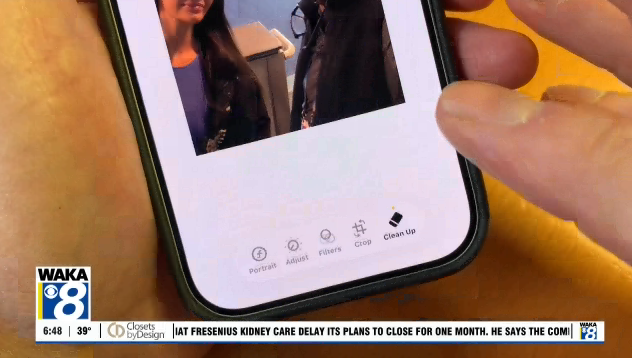
Apple recently added a feature called Clean Up inside the Photos app.
Here’s how to use it:
1. Open a photo in the Photos app
2. Tap Edit
3. Select the Clean Up tool
4. Circle or swipe over the object or person you want to remove
Just like that… it disappears.
In many cases, it does a surprisingly good job. A random person in the background can vanish.
That clutter on the table behind your family photo? Gone in seconds.
How It Works on Android and Google Photos
Google has actually been doing this longer with a feature called Magic Eraser.
It’s built into Google Photos and works very similarly:
● Tap edit on a photo
● Choose Magic Eraser
● Let it suggest objects to remove, or select them yourself
One advantage: it can automatically highlight distractions it thinks you’ll want gone.
Which One Is Better?
Both tools are impressive, especially when removing people or objects in the background.
In testing:
● Both handled simple background distractions very well
● Google’s Magic Eraser often did a better job with more complex edits, especially when the subject was closer to the camera
Neither is perfect.
If you look closely, you might notice:
● Slight blurring or smudging
● Patterns that don’t quite match
● Areas that look a little “off”
These tools work best on simple backgrounds like sky, grass, or walls.
A Handy Trick You’ll Actually Use
Knowing this feature exists can actually change how you take photos.
If something small is ruining your shot, don’t delete it right away. There’s a good chance you can fix it later.
That picture you were ready to toss might turn into one you keep… and share for years.
One Thing to Keep in Mind
These tools don’t just improve photos. They can change reality.
You can remove people, objects, and details that were actually there.
That doesn’t mean you shouldn’t use them. Just remember, what you’re seeing in a photo might not always be exactly what happened.
Bottom Line
● Your phone can likely remove unwanted objects right now
● It’s fast, easy, and often impressive
● It works best on simple backgrounds
● And it’s only getting better
Just don’t believe everything you see.