What The Tech: Limits on the number of spam numbers you can block
BY JAMEY TUCKER, Consumer Tech Reporter
If you block every scam number that calls your iPhone, eventually you may run into a problem you probably didn’t know existed: Apple limits how many phone numbers you can block.
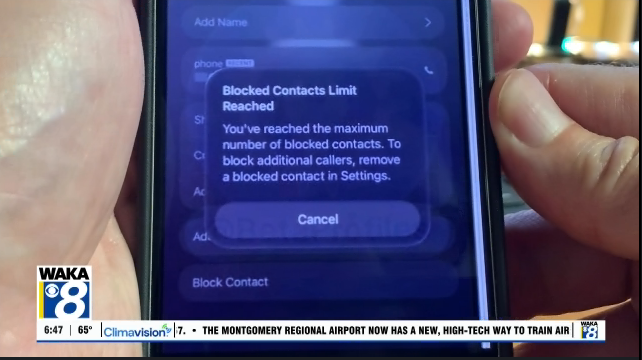
A viewer tipped me off to the issue after her husband tried to block yet another scam caller. Instead of adding the number to his blocked list, his iPhone displayed an alert saying he had reached the maximum number of blocked contacts.
To block another number, he would first have to unblock one he’d already blocked. How many numbers can you block on an iPhone?
That’s where things get strange. Apple does not publicly specify exactly how many phone numbers or contacts an iPhone can block.
Some iPhone users online report receiving the warning after accumulating around 3,000 blocked entries, while others say they’ve been able to block 8,000 or more.
For someone who routinely blocks every scam or robocall, reaching several thousand isn’t as far-fetched as it sounds.
According to the YouMail Robocall Index, Americans received approximately 4.3 billion robocalls in July 2026 alone. That’s about 139 million calls every day and roughly 13 robocalls for every person in the country during the month. YouMail estimates 27 percent of those robocalls were scams.
The bigger problem: clearing your blocked list If you’ve reached Apple’s limit, you’ll need to remove some old numbers before you can add new ones.
On an iPhone, go to your blocked contacts list in Settings. From there, you can swipe across a number and choose Unblock. The problem is that the iPhone doesn’t provide a convenient way to select thousands of old numbers and remove them all at once. If you’ve accumulated a huge blocked list, cleaning it up on the phone can take a very long time.
There is a faster option for Mac users. Depending on the version of macOS you’re running, you can access the blocked contacts list on the Mac and select multiple entries for removal at the same time.
What about Android? Google does not publish a maximum number of blocked phone numbers for Android’s Google Phone app, and there does not appear to be a comparable widely reported problem with Android users reaching a blocked-number limit. That doesn’t necessarily mean Android blocking is unlimited. It means Google doesn’t document a specific maximum.
Will old scammers start calling again?
If you remove hundreds or thousands of old numbers from your blocked list, you might wonder whether your phone will suddenly start ringing with calls from all those scammers again. Probably not.
Scammers frequently rotate phone numbers or spoof numbers that don’t actually belong to them. A number you blocked months or years ago may no longer be used by that scammer at all. That’s also why blocking every individual scam number isn’t necessarily the best defense anymore.
Let your phone screen the calls instead Both iPhones and Android phones now have more sophisticated tools for dealing with unwanted calls. With iOS 26 and newer, an iPhone can screen unknown callers before the phone rings, asking the caller for information about who they are and why they’re calling.
You can also silence unknown callers. Google Pixel phones offer automatic Call Screen, which can screen spam, possibly faked numbers and first-time callers.
Calls identified as spam can be declined without bothering you. So if you’ve already accumulated thousands of blocked numbers and finally hit Apple’s limit, you may not want to start building another enormous list. Let the phone do more of the work instead.