What The Tech: Can someone control your smartphone without your permission?
BY JAMEY TUCKER, Consumer Tech Reporter
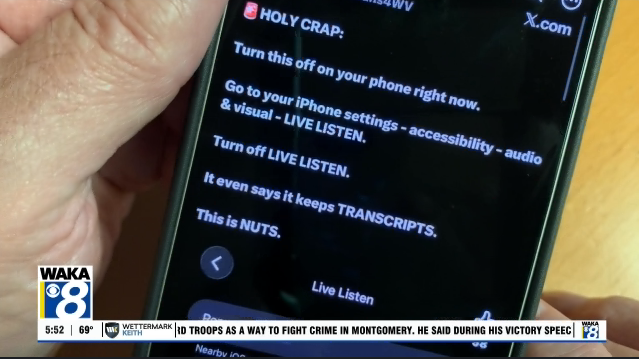
A warning circulating on Facebook claims an iPhone update allows someone to remotely
access your phone. Posts and videos point to a setting called “Remote Control” and urge people
to turn it off.
The setting exists. But the warnings leave out important details about what it controls and who
can use it.
What Live Listen actually does
The setting is under Settings → Accessibility → Audio & Visual → Live Listen.
Live Listen is an accessibility feature that turns your iPhone into a microphone, sending sound
to compatible AirPods or hearing devices. It can help someone hear a conversation across a
table or follow a speaker in a noisy room.
To demonstrate, I recorded my own voice and played the video on an iPad, with my iPhone
beside it. Wearing AirPods connected to the iPhone, I could clearly hear the recording picked up
by the phone’s microphone.
Live Listen also supports captions of spoken words. Those captions represent speech picked up
during the listening session. They aren’t a record of your text messages, browsing history, or
everything you do on your phone.
What “Remote Control” means
According to Apple’s Live Listen documentation, a nearby paired Apple Watch can start or stop
a Live Listen session and display captions.
Apple also supports remote operation through another nearby compatible iPhone or iPad signed
into the same Apple Account.
That account requirement is a key detail missing from the warnings. Turning on this setting does
not give random strangers access to your iPhone.
However, remote control is a real capability. Someone with access to an eligible device on your
account could potentially use it to start a listening session. That’s different from the claim that
anyone can remotely monitor your phone.
Should you turn it off?
If you don’t want another device to control Live Listen, you can disable that capability:
1. Open Settings.
2. Tap Accessibility.
3. Select Audio & Visual.
4. Tap Live Listen.
5. Turn off Remote Control.
An enabled Remote Control switch does not, by itself, mean a listening session is running. It
permits remote operation; a session still has to be started.
The posts also claim Apple turned the setting on automatically. I haven’t verified that claim
across updated iPhones. Finding it enabled on one phone wouldn’t establish that it was enabled
for everyone.
The warning takes a real hearing feature and describes it as broad access to your phone.
Understanding what the switch actually does is more useful than its alarming name.