What the Tech: Christmas photos as gifts
BY JAMEY TUCKER, CONSUMER TECH REPORTER
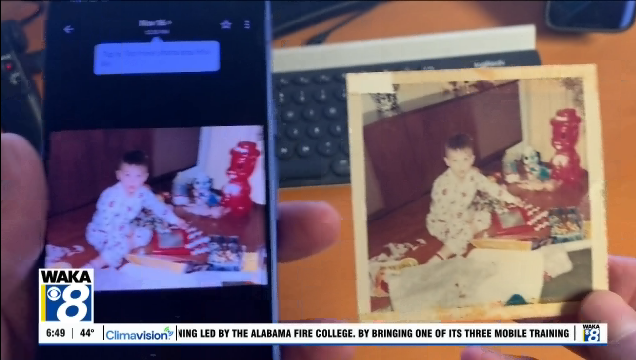
If you’re visiting family over Thanksgiving, bring your smartphone. You could turn a box of forgotten photographs into a Christmas gift they’ll treasure for years. And it doesn’t have to cost a penny.
Someone in your family probably has a box of old photographs tucked away in a closet. Maybe there are several photo albums gathering dust on a bookshelf or a stack of old yearbooks no one’s opened in decades.
Those pictures hold some of your family’s most treasured memories.
But when was the last time anyone looked at them?
Thanksgiving is the perfect opportunity to bring those memories back to life. And with a smartphone and a couple of free apps, you can turn them into a Christmas gift that means more than something bought at a store.
I did this for my mom a few years ago. She still tells me it’s the best Christmas present she’s ever received.
Turn Your Smartphone Into a Photo Scanner
You don’t need an expensive photo scanner to digitize old family pictures. The camera on your smartphone will do the job. Start by gathering the photographs you want to preserve.
Find a table with good lighting, preferably near a window. Avoid direct sunlight or overhead lights that could create glare on glossy photographs. Position your phone directly above the pictures. A tripod or smartphone mount works best, but you can improvise by propping your phone securely between books. You could photograph each picture individually, but there’s a faster way.
Scan Dozens of Pictures in Minutes
Instead of tapping the camera shutter over and over, use an app that automatically takes pictures at regular intervals. Two free options are:
● Intervalo for iPhone: Set the camera to automatically take a picture every few seconds.
● Open Camera for Android:
This free camera app includes a repeat shooting feature with adjustable intervals. Set the app to take a photograph every three seconds. Place an old picture beneath the camera, then replace it with another before the next shot. Once you get into a rhythm, you can photograph dozens of family pictures in less than five minutes. Just make sure each photo is flat, properly positioned, and in focus.
You may need to crop or straighten the images afterward.
Remove Glare From Old Photographs
Some older photographs have glossy finishes that reflect light, making them difficult to photograph. That’s where Google’s free PhotoScan app comes in.
Available for iPhone and Android, PhotoScan guides you through capturing a picture from several angles.
You’ll see four circles on your screen. Move your phone to line up each circle, and the app combines the images to reduce glare. It also helps straighten and crop your photographs. PhotoScan takes longer than using an interval camera, but it’s worth the extra effort for especially important pictures. You can also use your phone’s built-in photo editing tools to adjust brightness, restore faded colors, or apply filters.
Some pictures may look better with their original vintage appearance preserved.
Turn Those Pictures Into a Christmas Movie
Once you’ve scanned the photographs, you can turn them into something your family can watch and share. On an iPhone, Apple’s free iMovie app lets you select photographs, arrange them in order, add transitions and music, and export the finished video.
On Android, Google Photos includes a feature called Highlight video that can combine selected photographs into a video with music. You can organize pictures chronologically, starting with childhood photographs and moving through the years. Or group them around family vacations, weddings, holidays, and other special occasions. Add a favorite song, and suddenly those forgotten pictures become a family movie. Once it’s finished, share the video with relatives so they can watch it on their phones, tablets, computers, or televisions.
Take It One Step Further With a Digital Photo Frame
If you’re looking for a physical Christmas present, consider buying a digital photo frame and loading it with the pictures you’ve scanned. Many digital frames connect to Wi-Fi and allow family members to add photographs remotely. Imagine giving your parents or grandparents a frame filled with pictures of their children growing up, family vacations, old friends, and loved ones they haven’t seen in years. Instead of those memories sitting inside a dusty album, they’ll appear throughout the day.
Don’t Forget to Record the Stories Behind the Pictures
Here’s one more idea, and it might turn out to be the most valuable part of this project. While you’re scanning those old photographs over Thanksgiving, ask your parents or grandparents about them. Who are the people in the pictures? Where were they taken? What was happening that day? Use your smartphone’s voice recorder to capture their answers. You might even incorporate some of those recordings into the Christmas video.
Years from now, your family will appreciate having those old photographs. But hearing your parents’ or grandparents’ voices telling the stories behind them could be even more meaningful.
The best Christmas gifts aren’t always the ones you buy. Sometimes they’re the memories you take the time to preserve.
And Thanksgiving, when everyone is together, is the perfect time to get started.